Clients
Clients are the people and companies you bill. Adding a client once saves their details for every future invoice and quote.

Add a client
Start a new client
Choose New client.
Fill in their details
Name is all that’s required. You can also add company, email, phone, address, tax/VAT number, a default currency, a document language, and notes.
Save
The client is now available in every picker.
Set a client’s default currency and new invoices for them start in that currency automatically.
The client detail page
Opening a client shows their contact info and a summary of their business with you.

- Per-currency stats: invoice count, total billed, and outstanding balance (kept separate per currency).
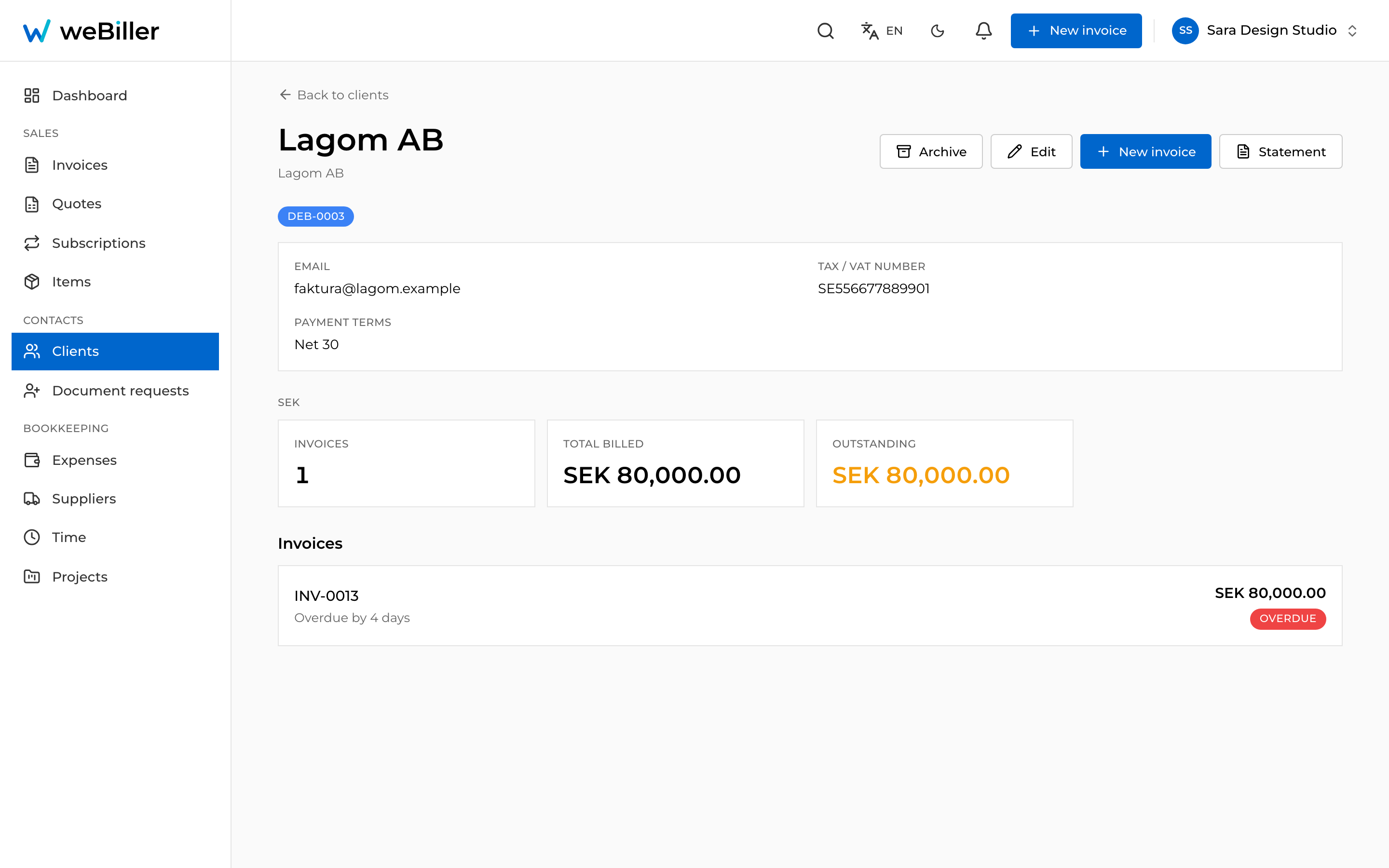
- Their invoices: a list of everything you’ve billed them.
- New invoice: start an invoice pre-filled for this client.
- Statement: everything outstanding for this client, bucketed by how overdue it is. See Reminders & dunning.
Reminders for one client
Each client has a Send automatic reminders switch. Turn it off and that debtor is excluded from the reminder ladder entirely, which is useful for the client you’d rather chase by phone. Their row is then marked Reminders off.
Archiving a client
Use Archive to hide a client you no longer work with, and Restore to bring them back.
A client who has no invoices is deleted when you archive them (there’s nothing to keep). A client with invoices is archived so their history stays intact. Turn on Show archived in the list to see archived clients.